Version Control Tools
Modern software projects change constantly. Developers add features, fix bugs, refactor existing code, update dependencies, and sometimes need to restore an earlier version after something goes wrong. Without a structured way to track these changes, even a small project can quickly become difficult to manage.
Version control tools solve this problem by recording the history of a project and helping individuals and teams work on the same codebase safely. However, terms such as Git, GitHub, GitLab, Bitbucket, repositories, branches, commits, and pull requests are often mixed together. This guide explains how these concepts are connected and introduces the most widely known version control tools and collaboration platforms.
What Is Version Control?
Version control is a system that records changes made to files over time. It allows developers to inspect previous versions, understand who changed something, compare revisions, restore deleted code, and coordinate work across a team.
A project managed by version control usually contains more than its current files. It also contains a structured history of changes. Each important change can be recorded as a snapshot called a commit.
Version control helps answer practical questions such as:
What changed between two versions of the project?
Who introduced a specific line of code?
Why was a file modified?
Can we restore the project to a stable state?
How can multiple developers work without overwriting one another?
How can a new feature be reviewed before it reaches production?
Although version control is strongly associated with software development, it can also manage configuration files, documentation, infrastructure definitions, scripts, research projects, and other text-based assets.
Why Version Control Is Essential
Saving files with names such as project-final, project-final-2, and project-final-really-final is not a reliable versioning strategy. It creates duplicated files but does not provide a meaningful history or explain how one version differs from another.
A proper version control system provides several important capabilities:
History: Every recorded change can include an author, date, message, and exact file differences.
Recovery: Earlier versions can be inspected or restored when necessary.
Parallel development: Developers can work on separate branches without modifying the main code immediately.
Collaboration: Teams can review, discuss, approve, and merge changes.
Accountability: The history shows when and why a change entered the project.
Automation: Commits and proposed changes can trigger tests, builds, security checks, and deployments.
Version control is therefore not only a backup mechanism. It is part of the development workflow, code-review process, release strategy, and software delivery pipeline.
Version Control System vs Hosting Platform
One of the most common beginner mistakes is treating Git and GitHub as the same product. They are related, but they solve different problems.
Git is a distributed version control system installed on a developer's computer.
GitHub is an online platform that hosts Git repositories and adds collaboration features.
GitLab, Bitbucket, and Azure Repos also host Git repositories and provide team-oriented tools.
You can use Git locally without creating a GitHub account. You can initialize a repository, create commits, make branches, merge changes, and inspect the project history entirely on your computer.
An online hosting platform becomes useful when you want to:
Store a remote copy of the repository.
Share the project with other developers.
Open pull requests or merge requests.
Review code and discuss changes.
Track issues and project tasks.
Configure automated testing and deployment.
Manage permissions, teams, and protected branches.
A simple way to remember the difference is:
Git manages the history of the code. A hosting platform manages collaboration around that history.
Centralized and Distributed Version Control
Version control systems are commonly divided into centralized and distributed models.
Centralized Version Control
In a centralized system, the main repository is stored on a central server. Developers connect to that server to retrieve files and submit changes.
This model can provide straightforward administration and a clear central source of truth. However, access to history and collaboration may depend more heavily on the availability of the central server.
Apache Subversion, commonly called SVN, is a well-known centralized version control system.
Distributed Version Control
In a distributed system, each developer usually has a local copy of the repository and its history. Many operations, including creating commits, viewing history, comparing revisions, and creating branches, can happen locally.
Git and Mercurial are distributed version control systems. Their distributed model supports offline work, flexible collaboration patterns, and multiple remote repositories.
Git: The Core Version Control Tool
Git is a free, open-source, distributed version control system. It is used to track project history and coordinate changes across developers and environments.
Git works with repositories. A repository contains the project files together with the information Git needs to track their history.
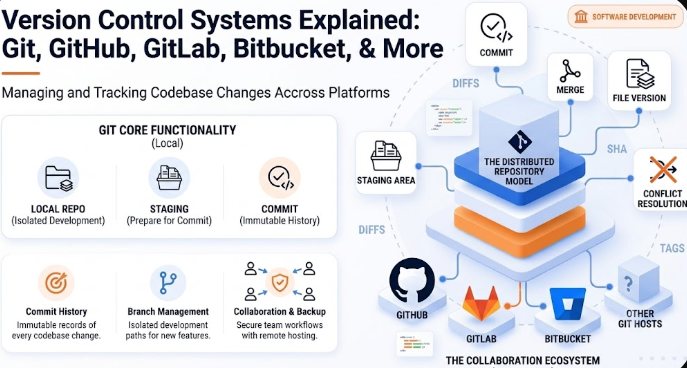
Important Git concepts include:
Repository: A project managed by Git.
Working directory: The files currently available for editing.
Staging area: A preparation area that lets you choose what will be included in the next commit.
Commit: A recorded snapshot of selected changes.
Branch: An independent line of development.
Merge: The process of combining changes from different branches.
Remote: A reference to another copy of the repository, often hosted online.
Tag: A named reference commonly used to mark a release.
A basic local Git workflow may look like this:
git init
git add .
git commit -m "Create the initial project structure"
To create a separate branch for a feature:
git switch -c feature/user-login

# Edit the project files

git add .
git commit -m "Add user login validation"
The feature can later be merged into the main branch after it has been tested and reviewed.
When Git Is the Right Choice
Git is the standard starting point for most modern software projects. It is suitable for individual developers, open-source projects, startups, distributed teams, enterprise systems, infrastructure repositories, and automated delivery workflows.
Learning Git is valuable even when a company uses GitHub, GitLab, Bitbucket, or Azure DevOps, because those platforms rely heavily on Git concepts and operations.
GitHub: Repository Hosting and Global Collaboration
GitHub is a platform for hosting Git repositories and collaborating on software projects. It is widely used for open-source development, public portfolios, private company repositories, documentation, and community-driven projects.
Its central collaboration feature is the pull request. A pull request proposes that changes from one branch should be reviewed and merged into another branch.
GitHub commonly supports workflows involving:
Public and private Git repositories.
Branches, forks, and pull requests.
Inline code review and team discussions.
Issues, labels, milestones, and project planning.
Release pages and repository tags.
Documentation through Markdown files and wikis.
Automated workflows through GitHub Actions.
Access controls and branch protection rules.
GitHub Pull Request Example
A developer creates a branch called feature/payment-validation, implements the change, pushes the branch to GitHub, and opens a pull request. Reviewers can inspect the changed lines, leave comments, request improvements, and approve the work. Automated tests may run before the branch is allowed to merge.
When GitHub Is a Strong Choice
GitHub is especially useful when public visibility, open-source collaboration, developer portfolios, community contributions, integrations, and a broad ecosystem are important.
GitLab: Repositories, Merge Requests, and Integrated Delivery
GitLab is another major platform built around Git repositories. It provides source-code hosting, collaboration, merge requests, project planning, and CI/CD capabilities.
GitLab uses the term merge request rather than pull request. The concept is similar: a developer proposes changes, the team reviews them, automated checks can run, and the approved work is merged into a target branch.
Common GitLab capabilities include:
Git repository hosting.
Merge requests and code review.
Issue tracking and project boards.
Built-in CI/CD pipelines configured through
.gitlab-ci.yml.Package and container-related workflows.
Protected branches and approval rules.
Self-managed deployment options for organizations that need more control over hosting.
When GitLab Is a Strong Choice
GitLab is often selected by teams that want repository management and delivery automation in a closely integrated environment. It can be useful for organizations that prefer a unified workflow or need a self-managed platform.
Bitbucket: Git Collaboration in the Atlassian Ecosystem
Bitbucket is Atlassian's Git repository hosting platform. It supports branches, pull requests, code reviews, repository permissions, and automated pipelines.
Bitbucket is frequently considered by teams already using other Atlassian products, particularly Jira and Confluence, because development work can be connected to tasks, requirements, documentation, and team processes.
Common Bitbucket features include:
Private and shared Git repositories.
Branch-based development.
Pull requests and merge controls.
Code review and reviewer assignment.
Bitbucket Pipelines for automated build, test, and deployment tasks.
Repository-level permissions and access tokens.
Integration with Jira work items and team workflows.
When Bitbucket Is a Strong Choice
Bitbucket can be a practical option for teams already invested in the Atlassian ecosystem or for organizations that want their repositories, issue tracking, and documentation workflows to remain closely connected.
Azure DevOps and Azure Repos
Azure DevOps is a collection of development services from Microsoft. Its repository component, Azure Repos, supports Git repositories and pull-request-based collaboration.
Azure DevOps may combine several services in one organizational workflow:
Azure Repos: Git repositories, branches, policies, and pull requests.
Azure Boards: Work items, backlogs, sprint planning, and task tracking.
Azure Pipelines: Build, test, validation, and deployment automation.
Azure Artifacts: Package management.
Test-related services: Tools for organizing and tracking testing activities.
Pull requests in Azure Repos can include reviewers, comments, voting, branch policies, build validation, and merge requirements.
When Azure DevOps Is a Strong Choice
Azure DevOps is often suitable for enterprise teams, Microsoft-oriented environments, organizations using structured work-item processes, and projects that need repositories, boards, pipelines, and permissions within one development suite.
Apache Subversion: Centralized Version Control
Apache Subversion, usually called SVN, is an open-source centralized version control system. Unlike Git, it normally uses a central repository as the primary source of project history.
Developers commonly check out a working copy from the server, modify files, update their local copy, and commit changes back to the central repository.
SVN remains relevant in some enterprise systems, long-running internal projects, centralized environments, and workflows that prefer a simpler server-controlled model.
Git vs SVN at a High Level
Git is distributed; SVN is centralized.
A Git clone usually contains the repository history; an SVN working copy depends more directly on the central repository.
Git strongly emphasizes local commits and lightweight branching.
SVN can be easier to understand for teams that want a strict central-server workflow.
SVN is not automatically a bad choice because it is older or centralized. The correct decision depends on project constraints, existing infrastructure, file types, organizational policies, and team experience.
Mercurial: A Distributed Alternative
Mercurial is a free, distributed source control management tool. Like Git, it gives each clone access to the project history and supports distributed workflows.
Mercurial is known for a command-line experience designed around consistency and approachability. Its commands use the hg executable.
A basic Mercurial workflow may look like this:
hg init
hg add
hg commit -m "Create the initial project"
Mercurial is less visible than Git in many current web-development communities, but it remains a real distributed version control system with its own workflows, extensions, and project history.
Comparison of Popular Version Control Tools and Platforms
| Tool or Platform | Type | Primary Purpose | Common Review Term | Typical Use Case |
|---|---|---|---|---|
| Git | Distributed version control system | Track project history locally and across remotes | Not platform-specific | Modern software development |
| GitHub | Git hosting and collaboration platform | Host repositories and collaborate | Pull Request | Open source, portfolios, teams, integrations |
| GitLab | Git hosting and development platform | Repositories, reviews, and integrated CI/CD | Merge Request | Unified development and delivery workflows |
| Bitbucket | Git hosting and collaboration platform | Team repositories and Atlassian integration | Pull Request | Teams using Jira and Confluence |
| Azure Repos | Git repository service | Enterprise repositories and policy-based reviews | Pull Request | Azure DevOps and Microsoft-oriented teams |
| Subversion | Centralized version control system | Manage history through a central repository | Depends on surrounding tools | Centralized and legacy enterprise workflows |
| Mercurial | Distributed version control system | Track history through distributed repositories | Depends on hosting platform | Teams preferring Mercurial workflows |
How a Modern Version Control Workflow Works
Although every team has its own process, a common Git-based workflow follows these steps:
A developer clones the remote repository.
The developer creates a branch for a feature or bug fix.
Code changes are made locally.
Relevant files are added to the staging area.
The developer creates one or more clear commits.
The branch is pushed to a hosting platform.
A pull request or merge request is opened.
Automated tests and quality checks run.
Reviewers inspect the code and request changes when necessary.
The approved branch is merged into the target branch.
The merged code may trigger a build, release, or deployment pipeline.
This process separates unfinished work from stable code and creates a visible review history.
Common Terms You Should Understand
Repository
A repository is the managed project and its version history.
Commit
A commit is a recorded group of changes. A strong commit should represent a meaningful unit of work and include a clear message.
Branch
A branch is an independent development line. Teams commonly use branches for features, bug fixes, experiments, and releases.
Merge
A merge combines changes from separate branches.
Merge Conflict
A conflict occurs when the version control system cannot safely decide how competing changes should be combined. A developer must review and resolve the affected lines.
Remote Repository
A remote repository is another copy of the project, usually located on a server or hosting platform.
Clone
Cloning creates a local copy of a repository.
Fetch
Fetching downloads information and changes from a remote repository without automatically integrating them into the current branch.
Pull
Pulling retrieves remote changes and attempts to integrate them into the current local work.
Push
Pushing sends local commits to a remote repository.
Fork
A fork is a separate server-side copy of a repository, commonly used when contributing to a project that you do not directly control.
Pull Request or Merge Request
A pull request or merge request is a proposal to review and merge a set of changes.
CI/CD Pipeline
A pipeline is an automated sequence of tasks such as installing dependencies, running tests, checking code quality, building artifacts, and deploying an application.
How to Choose the Right Tool
There is no single platform that is automatically best for every project. A useful decision should consider the team's workflow rather than only popularity.
Choose Git as the Version Control Foundation When:
You are building a modern software project.
You want distributed development and local history.
You need strong branching and merging workflows.
You expect to use GitHub, GitLab, Bitbucket, or Azure Repos.
Consider GitHub When:
Open-source visibility is important.
You want a public developer portfolio.
You need a large collaboration and integration ecosystem.
Your team prefers pull-request-based development.
Consider GitLab When:
You want repository hosting and CI/CD in a closely connected workflow.
Your organization is interested in self-managed hosting.
You prefer merge-request-centered development.
Consider Bitbucket When:
Your team already uses Jira or Confluence.
You want repository activity connected to Atlassian project workflows.
You need private team collaboration and integrated pipelines.
Consider Azure DevOps When:
Your company uses Azure Boards, Azure Pipelines, or Microsoft enterprise tooling.
You need detailed branch policies and structured approval workflows.
You want source control and project planning in one suite.
Consider Subversion When:
You are maintaining an existing SVN-based project.
Your workflow deliberately requires centralized control.
Your organization has infrastructure and policies built around SVN.
Consider Mercurial When:
You are contributing to an existing Mercurial project.
Your team prefers its distributed model and command structure.
You have tooling or infrastructure already designed around Mercurial.
Common Beginner Misunderstandings
“GitHub Is Git”
GitHub uses Git, but Git exists independently. Git is the version control engine; GitHub is a hosting and collaboration platform.
“A Commit Is the Same as Saving a File”
Saving changes updates a file in the working directory. A commit deliberately records selected changes in the repository history.
“Git Is Only for Teams”
Git is valuable for individual work because it creates history, supports experiments, and makes recovery easier.
“Version Control Is a Complete Backup Strategy”
A repository is an important copy of project history, but it should not be treated as the only backup for databases, uploaded files, credentials, build artifacts, or production infrastructure.
“Every File Should Be Committed”
Generated files, temporary files, local environment settings, dependency folders, build output, and secrets often should not enter the repository. Git projects commonly use a .gitignore file to exclude them.
“More Commits Always Mean Better History”
The goal is not to maximize the number of commits. The goal is to create understandable, focused commits that make the history useful.
Version Control Best Practices
Write commit messages that explain the purpose of the change.
Keep commits focused on one logical task when possible.
Use branches for features, fixes, and experiments.
Pull or fetch recent changes before starting risky integrations.
Review changed files before committing.
Never commit passwords, API keys, private certificates, or production secrets.
Use pull requests or merge requests for important changes.
Run automated tests before merging.
Protect important branches such as
mainor release branches.Tag stable versions and releases consistently.
Document the team's branching, review, and release strategy.
A Practical Learning Order
Beginners do not need to learn every platform at once. A practical learning path is:
Understand repositories, commits, branches, and merges.
Install Git and create a local repository.
Practice
status,add,commit, andlog.Learn how branches work.
Understand remotes, cloning, fetching, pulling, and pushing.
Create a GitHub or GitLab repository.
Practice pull requests or merge requests.
Learn how to resolve merge conflicts.
Study reset, restore, revert, and stash carefully.
Add automated tests through a CI/CD workflow.
Learn a real team workflow such as feature branches or trunk-based development.
Once the Git foundation is clear, moving between GitHub, GitLab, Bitbucket, and Azure Repos becomes much easier because many underlying concepts are shared.
Frequently Asked Questions
Do I Need GitHub to Use Git?
No. Git can manage a repository entirely on your local computer. GitHub is only one option for hosting and collaboration.
Can the Same Git Repository Use More Than One Remote Platform?
Yes. A Git repository can have multiple remotes. For example, a team may keep a primary repository on GitHub and a mirror on another server.
Are Pull Requests Part of Git?
No. Pull requests and merge requests are collaboration features provided by hosting platforms. Git itself provides branches, commits, diffs, merges, and other repository operations.
Which Tool Should a Beginner Learn First?
Start with Git fundamentals, then use GitHub or GitLab to practice remote repositories and code review. Learning a platform without understanding Git often causes confusion when branches, commits, remotes, and conflicts appear.
Is SVN Still Used?
Yes. Some organizations and long-running projects continue to use Subversion. However, many new software projects choose distributed version control, especially Git.
Is Git Only for Source Code?
No. Git can track many file types, but it works especially well with text files. Large binary files may require additional tools or a different repository strategy.
Conclusion
Version control provides the historical foundation of modern software development. It records changes, protects project history, supports parallel work, and enables teams to review and deliver code in a controlled way.
Git is the version control system at the center of many current development workflows. GitHub, GitLab, Bitbucket, and Azure DevOps add remote hosting, permissions, code review, project management, and automation around Git repositories. Subversion represents the centralized model, while Mercurial provides another distributed approach.
The most important first step is not choosing the platform with the longest feature list. It is understanding the core workflow: create focused changes, record them clearly, work through branches, review before merging, and maintain a history that future developers can trust.
Official References
Git Documentation: https://git-scm.com/docs/git
Pro Git Book: https://git-scm.com/book/en/v2
GitHub Pull Requests: https://docs.github.com/pull-requests
GitLab Merge Requests: https://docs.gitlab.com/user/project/merge_requests/
Bitbucket Cloud Documentation: https://support.atlassian.com/bitbucket-cloud/
Azure Repos Pull Requests: https://learn.microsoft.com/azure/devops/repos/git/pull-requests
Apache Subversion: https://subversion.apache.org/
Mercurial SCM: https://www.mercurial-scm.org/