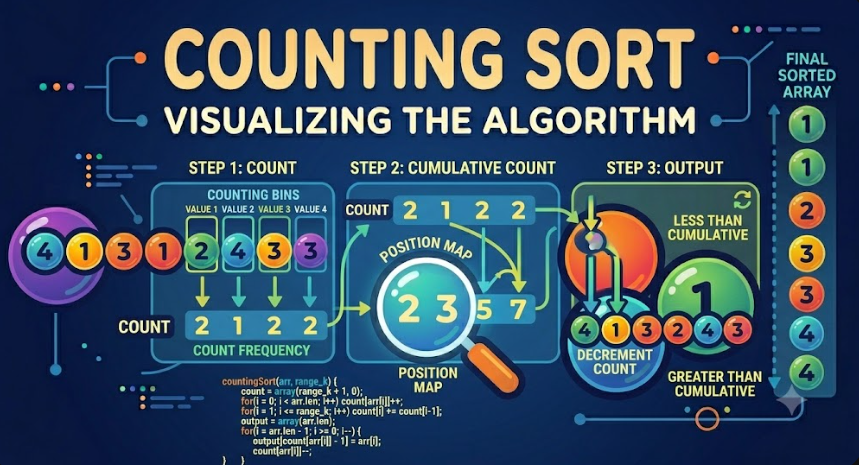
Counting Sort Algorithm Explained
Counting Sort is a non-comparison sorting algorithm that sorts integers by counting how many times each value appears in the input array. Instead of comparing elements with each other, it uses a count array to record frequencies and then rebuilds the sorted result.
Counting Sort can be very fast when the range of values is not too large. Its time complexity is O(n + k), where n is the number of elements and k is the range of possible values. This makes it different from comparison-based algorithms such as Bubble Sort, Selection Sort, Insertion Sort, Merge Sort, and Quicksort.
Introduction
Most beginner sorting algorithms work by comparing values. Bubble Sort compares neighboring elements, Selection Sort searches for the smallest value, Insertion Sort compares the current value with previous values, and Quicksort compares elements with a pivot.
Counting Sort uses a different idea. It does not ask whether one element is greater or smaller than another element many times. Instead, it counts the number of occurrences of each value, then uses those counts to place values in sorted order.
This makes Counting Sort especially useful when sorting integers inside a limited range, such as exam scores from 0 to 100, ages, small IDs, ratings, or repeated numeric categories.
What Is Counting Sort?
Counting Sort is a sorting algorithm designed for integer values. It works by creating an additional array called a count array or frequency array. Each index in this count array represents a possible value from the input array.
For every number in the input array, the algorithm increases the count of that number. After all values are counted, the algorithm reconstructs the sorted array by placing each value according to how many times it appeared.
The main idea is simple:
Find the range of values in the array.
Create a count array.
Count how many times each value appears.
Use the count array to rebuild the sorted output.
Counting Sort is called “counting” because counting frequencies is the main operation of the algorithm.
Why Counting Sort Is Different
Counting Sort is different from many common sorting algorithms because it is not comparison-based. This means it does not sort by repeatedly comparing pairs of elements.
For example, Quicksort asks questions like:
Is this value less than or equal to the pivot?Insertion Sort asks questions like:
Is the previous value greater than the current value?Counting Sort asks a different question:
How many times did this value appear?This difference allows Counting Sort to achieve linear-like performance when the value range is small enough.
When Counting Sort Works Best
Counting Sort works best when the input values are integers and the range of possible values is limited.
For example, Counting Sort is suitable for:
Sorting exam scores between 0 and 100.
Sorting ages within a small range.
Sorting product ratings from 1 to 5.
Sorting small category IDs.
Sorting repeated integer values.
Counting Sort is not suitable when the range is very large compared to the number of elements. For example, sorting only 10 numbers where values can be between 0 and 1,000,000 may waste a lot of memory.
How Counting Sort Works Step by Step
Counting Sort can be explained using a simple version first. This version counts frequencies and then directly rebuilds the sorted array.
The algorithm follows these steps:
Find the maximum value in the input array.
Create a count array with size max + 1.
Initialize all count values to zero.
Loop through the input array and count each value.
Loop through the count array and write each value back according to its frequency.
This simple version is easy to understand and works well when we only need sorted numbers. A stable version uses cumulative counts and an output array, which we will explain later.
Manual Run Example
Let us manually sort the following array using Counting Sort:
[4, 2, 2, 8, 3, 3, 1]The smallest value is 1 and the largest value is 8. For the simple version, we create a count array from index 0 to 8.
Value:  0 1 2 3 4 5 6 7 8
Count:  0 0 0 0 0 0 0 0 0
Step 1: Count Frequencies
Now we read each value from the input array and increase its count.
The first value is 4:
Value:  0 1 2 3 4 5 6 7 8
Count:  0 0 0 0 1 0 0 0 0
The next value is 2:
Value:  0 1 2 3 4 5 6 7 8
Count:  0 0 1 0 1 0 0 0 0
The next value is 2 again:
Value:  0 1 2 3 4 5 6 7 8
Count:  0 0 2 0 1 0 0 0 0
The next value is 8:
Value:  0 1 2 3 4 5 6 7 8
Count:  0 0 2 0 1 0 0 0 1
The next value is 3:
Value:  0 1 2 3 4 5 6 7 8
Count:  0 0 2 1 1 0 0 0 1
The next value is 3 again:
Value:  0 1 2 3 4 5 6 7 8
Count:  0 0 2 2 1 0 0 0 1
The final value is 1:
Value:  0 1 2 3 4 5 6 7 8
Count:  0 1 2 2 1 0 0 0 1
This means:
Value 1 appears once.
Value 2 appears twice.
Value 3 appears twice.
Value 4 appears once.
Value 8 appears once.
Step 2: Rebuild the Sorted Array
Now we read the count array from left to right. For each index, we write that index into the result as many times as its count.
Index 0 has count 0, so we write nothing.
Index 1 has count 1, so we write 1:
[1]Index 2 has count 2, so we write 2 twice:
[1, 2, 2]Index 3 has count 2, so we write 3 twice:
[1, 2, 2, 3, 3]Index 4 has count 1, so we write 4:
[1, 2, 2, 3, 3, 4]Indexes 5, 6, and 7 have count 0, so we write nothing.
Index 8 has count 1, so we write 8:
[1, 2, 2, 3, 3, 4, 8]Final Sorted Array
[1, 2, 2, 3, 3, 4, 8]This manual run shows the core idea of Counting Sort. The algorithm sorted the array by counting values, not by comparing them with each other.
Counting Sort Algorithm Steps
The simple Counting Sort algorithm can be described like this:
Find the maximum value in the array.
Create a count array from 0 to the maximum value.
Count the occurrences of each input value.
Create an empty result array.
For each value in the count array, append the value according to its count.
Return the sorted result.
This version is easy to implement, but it is not always stable when sorting objects or records. For stable sorting, cumulative counts are needed.
Pseudocode for Simple Counting Sort
countingSort(array):
    max = find maximum value in array

    count = array of size max + 1 filled with 0

    for each value in array:
        count[value] = count[value] + 1

    result = empty array

    for value from 0 to max:
        while count[value] > 0:
            append value to result
            count[value] = count[value] - 1

    return result
This pseudocode works for non-negative integers. If the array contains negative numbers, we need to use an offset, which will be explained later.
Counting Sort Example in PHP
Here is a simple PHP implementation of Counting Sort for non-negative integers:
<?php

function countingSort(array $numbers): array
{
    if ($numbers === []) {
        return [];
    }

    $max = max($numbers);
    $count = array_fill(0, $max + 1, 0);

    foreach ($numbers as $number) {
        $count[$number]++;
    }

    $sorted = [];

    for ($value = 0; $value <= $max; $value++) {
        while ($count[$value] > 0) {
            $sorted[] = $value;
            $count[$value]--;
        }
    }

    return $sorted;
}

$numbers = [4, 2, 2, 8, 3, 3, 1];

print_r(countingSort($numbers));
The output will be:
Array
(
    [0] => 1
    [1] => 2
    [2] => 2
    [3] => 3
    [4] => 3
    [5] => 4
    [6] => 8
)
This implementation is direct and easy to read. It counts every number, then creates the sorted result based on the frequency array.
Counting Sort Example in JavaScript
Here is the same algorithm implemented in JavaScript:
function countingSort(numbers) {
    if (numbers.length === 0) {
        return [];
    }

    const max = Math.max(...numbers);
    const count = new Array(max + 1).fill(0);

    for (const number of numbers) {
        count[number]++;
    }

    const sorted = [];

    for (let value = 0; value <= max; value++) {
        while (count[value] > 0) {
            sorted.push(value);
            count[value]--;
        }
    }

    return sorted;
}

const numbers = [4, 2, 2, 8, 3, 3, 1];

console.log(countingSort(numbers));
The output will be:
[1, 2, 2, 3, 3, 4, 8]The JavaScript version follows the same logic as the PHP version. The count array stores frequencies, and the sorted array is rebuilt from the count values.
Stable Counting Sort
The simple version of Counting Sort is enough for sorting plain numbers. However, when sorting records or objects, stability becomes important.
A stable sorting algorithm preserves the relative order of equal elements. For example, imagine we have students with scores:
Ali: 90
Sara: 80
Omar: 90
Lina: 70
If we sort by score and the algorithm is stable, Ali should still appear before Omar because both have the same score and Ali appeared first in the original list.
Stable Counting Sort uses cumulative counts to determine the final position of each element.
What Is Cumulative Count?
A cumulative count tells us how many elements are less than or equal to a certain value. It is created by adding each count value to the previous count value.
Consider the frequency array from the manual example:
Value:  0 1 2 3 4 5 6 7 8
Count:  0 1 2 2 1 0 0 0 1
Now we convert it into cumulative count:
Value:       0 1 2 3 4 5 6 7 8
Cumulative: 0 1 3 5 6 6 6 6 7
This means:
There is 1 element less than or equal to 1.
There are 3 elements less than or equal to 2.
There are 5 elements less than or equal to 3.
There are 7 elements less than or equal to 8.
Cumulative count helps the algorithm know the correct final position of each value in the output array.
Manual Run for Stable Counting Sort
Let us use the same input:
[4, 2, 2, 8, 3, 3, 1]The frequency count is:
Value:  0 1 2 3 4 5 6 7 8
Count:  0 1 2 2 1 0 0 0 1
The cumulative count is:
Value:       0 1 2 3 4 5 6 7 8
Cumulative: 0 1 3 5 6 6 6 6 7
Now we create an output array with the same size as the input:
Output: [_, _, _, _, _, _, _]To keep the sort stable, we process the original array from right to left.
The last value is 1. The cumulative count of 1 is 1, so 1 goes to index 0. Then we decrease the count of 1.
Output: [1, _, _, _, _, _, _]The next value from the right is 3. The cumulative count of 3 is 5, so 3 goes to index 4. Then we decrease the count of 3.
Output: [1, _, _, _, 3, _, _]The next value is 3 again. The cumulative count of 3 is now 4, so this 3 goes to index 3.
Output: [1, _, _, 3, 3, _, _]The next value is 8. The cumulative count of 8 is 7, so 8 goes to index 6.
Output: [1, _, _, 3, 3, _, 8]The next value is 2. The cumulative count of 2 is 3, so 2 goes to index 2.
Output: [1, _, 2, 3, 3, _, 8]The next value is 2 again. The cumulative count of 2 is now 2, so this 2 goes to index 1.
Output: [1, 2, 2, 3, 3, _, 8]The final value is 4. The cumulative count of 4 is 6, so 4 goes to index 5.
Output: [1, 2, 2, 3, 3, 4, 8]The stable Counting Sort result is:
[1, 2, 2, 3, 3, 4, 8]For plain numbers, the result looks the same as the simple version. The difference becomes important when equal values belong to larger records or objects.
Pseudocode for Stable Counting Sort
stableCountingSort(array):
    max = find maximum value in array

    count = array of size max + 1 filled with 0
    output = array of same size as input

    for each value in array:
        count[value] = count[value] + 1

    for i from 1 to max:
        count[i] = count[i] + count[i - 1]

    for i from length(array) - 1 down to 0:
        value = array[i]
        position = count[value] - 1
        output[position] = value
        count[value] = count[value] - 1

    return output
This version is stable because it processes the input from right to left and uses cumulative counts to place values correctly.
Stable Counting Sort in PHP
Here is a stable PHP implementation:
<?php

function stableCountingSort(array $numbers): array
{
    if ($numbers === []) {
        return [];
    }

    $max = max($numbers);
    $count = array_fill(0, $max + 1, 0);
    $output = array_fill(0, count($numbers), 0);

    foreach ($numbers as $number) {
        $count[$number]++;
    }

    for ($i = 1; $i <= $max; $i++) {
        $count[$i] += $count[$i - 1];
    }

    for ($i = count($numbers) - 1; $i >= 0; $i--) {
        $value = $numbers[$i];
        $position = $count[$value] - 1;

        $output[$position] = $value;
        $count[$value]--;
    }

    return $output;
}

$numbers = [4, 2, 2, 8, 3, 3, 1];

print_r(stableCountingSort($numbers));
This version uses an output array and cumulative counts. It is more suitable when the order of equal elements matters.
Stable Counting Sort in JavaScript
function stableCountingSort(numbers) {
    if (numbers.length === 0) {
        return [];
    }

    const max = Math.max(...numbers);
    const count = new Array(max + 1).fill(0);
    const output = new Array(numbers.length);

    for (const number of numbers) {
        count[number]++;
    }

    for (let i = 1; i <= max; i++) {
        count[i] += count[i - 1];
    }

    for (let i = numbers.length - 1; i >= 0; i--) {
        const value = numbers[i];
        const position = count[value] - 1;

        output[position] = value;
        count[value]--;
    }

    return output;
}

const numbers = [4, 2, 2, 8, 3, 3, 1];

console.log(stableCountingSort(numbers));
The output will be:
[1, 2, 2, 3, 3, 4, 8]This implementation is useful for understanding how cumulative counts control final positions.
Handling Negative Numbers
The basic Counting Sort implementation assumes that all values are non-negative integers. This is because array indexes usually start from 0, and we use the value itself as an index.
If the input contains negative numbers, we can solve the problem using an offset.
For example:
[-3, -1, 2, 0, -1]The minimum value is -3. We can shift every value by subtracting the minimum value:
index = value - minSo:
-3 becomes index 0.
-1 becomes index 2.
0 becomes index 3.
2 becomes index 5.
When rebuilding the sorted result, we convert the index back to the original value:
value = index + minCounting Sort with Negative Numbers in PHP
<?php

function countingSortWithNegativeNumbers(array $numbers): array
{
    if ($numbers === []) {
        return [];
    }

    $min = min($numbers);
    $max = max($numbers);
    $range = $max - $min + 1;

    $count = array_fill(0, $range, 0);

    foreach ($numbers as $number) {
        $count[$number - $min]++;
    }

    $sorted = [];

    for ($i = 0; $i < $range; $i++) {
        while ($count[$i] > 0) {
            $sorted[] = $i + $min;
            $count[$i]--;
        }
    }

    return $sorted;
}

$numbers = [-3, -1, 2, 0, -1];

print_r(countingSortWithNegativeNumbers($numbers));
The output will be:
Array
(
    [0] => -3
    [1] => -1
    [2] => -1
    [3] => 0
    [4] => 2
)
This offset technique makes Counting Sort work with negative integers while keeping the same counting idea.
Time Complexity of Counting Sort
Time complexity describes how the running time of an algorithm grows as the input size increases. Counting Sort has a different time complexity from comparison-based algorithms because it depends on both the number of elements and the range of values.
The time complexity of Counting Sort is:
O(n + k)Where:
n is the number of elements in the input array.
k is the range of possible values.
For example, if we sort 1,000 exam scores between 0 and 100, then n is 1,000 and k is 101. This is very efficient.
Why Counting Sort Is O(n + k)
Counting Sort performs several linear steps:
It scans the input array to count values. This costs O(n).
It scans the count array. This costs O(k).
It builds the output array. This costs O(n) or O(n + k), depending on implementation.
When these steps are combined, the result is:
O(n + k)This is faster than O(n log n) when k is small or close to n. But if k is extremely large, Counting Sort may become inefficient.
Best Case Time Complexity
The best case time complexity of Counting Sort is:
O(n + k)Counting Sort still needs to count the elements and process the count array, even if the input is already sorted. Unlike Insertion Sort, it does not become O(n) just because the array is already sorted.
Average Case Time Complexity
The average case time complexity is also:
O(n + k)The algorithm follows the same counting and reconstruction steps regardless of the original order of the input.
Worst Case Time Complexity
The worst case time complexity is:
O(n + k)However, the practical cost becomes high when k is very large. For example, sorting 10 numbers where values range from 0 to 1,000,000 requires a count array with 1,000,001 positions.
This is why Counting Sort is efficient only when the value range is reasonable.
Space Complexity of Counting Sort
Counting Sort requires additional memory for the count array. Stable Counting Sort also requires an output array.
The space complexity is usually:
O(n + k)Where n is the input size and k is the value range.
The count array needs O(k) space, and the output array needs O(n) space in the stable version. The simple version can avoid a separate output array in some implementations, but it still needs the count array.
Is Counting Sort Stable?
Counting Sort can be stable, but not every implementation is stable.
The simple version that only counts values and rebuilds the sorted array is fine for plain numbers, but it does not preserve the order of equal records because it does not track original positions.
The stable version uses cumulative counts and processes the input from right to left. This preserves the relative order of equal elements.
So the correct answer is:
Simple Counting Sort for numbers: stability is not very visible.
Stable Counting Sort with cumulative count: stable.
Counting Sort without cumulative placement for records: not necessarily stable.
Is Counting Sort In-Place?
Counting Sort is generally not considered an in-place sorting algorithm because it requires extra memory for the count array. Stable Counting Sort also requires an output array.
This is different from algorithms such as Insertion Sort or in-place Quicksort, which can sort using only a small amount of extra memory.
Counting Sort trades memory for speed. It can be very fast, but it needs additional storage proportional to the value range.
Counting Sort vs Comparison-Based Sorting
Comparison-based algorithms sort by comparing elements. Examples include Bubble Sort, Selection Sort, Insertion Sort, Merge Sort, Heap Sort, and Quicksort.
Counting Sort avoids direct comparisons between elements. Instead, it uses the values as indexes in a count array.
This difference is important because comparison-based sorting algorithms have a theoretical lower bound of O(n log n) for general sorting. Counting Sort can be faster than that under specific conditions because it uses information about the value range.
However, Counting Sort is not a universal replacement for comparison-based sorting. It only works well when the data is integer-based and the range is not too large.
Counting Sort vs Quicksort
Quicksort is a general-purpose comparison-based sorting algorithm. It can sort many types of comparable data, such as numbers, strings, dates, and objects with custom comparison rules.
Counting Sort is more specialized. It works best for integers within a limited range.
Quicksort average time complexity is O(n log n).
Counting Sort time complexity is O(n + k).
Quicksort is usually in-place.
Counting Sort needs extra memory.
Quicksort works for general comparable values.
Counting Sort works mainly for integer ranges.
If k is small, Counting Sort can be faster. If k is huge or values are not integers, Quicksort or built-in sorting functions are usually better.
Counting Sort vs Radix Sort
Counting Sort is often used as a subroutine inside Radix Sort. Radix Sort sorts numbers digit by digit, and Counting Sort is commonly used to sort each digit position in a stable way.
This is one reason stable Counting Sort is important. If Counting Sort were not stable, Radix Sort would not work correctly in many implementations.
Counting Sort sorts based on the whole value when the range is manageable. Radix Sort breaks large numbers into digits or characters and sorts them step by step.
When Should Developers Use Counting Sort?
Developers should use Counting Sort when the data matches the algorithm's strengths.
Counting Sort is useful when:
The values are integers.
The range of values is small or reasonable.
The number of elements is large compared to the range.
Linear-time sorting is desired.
The data contains many repeated values.
Stable sorting is needed and cumulative count can be used.
For example, sorting thousands of student scores from 0 to 100 is a strong use case for Counting Sort.
When Not to Use Counting Sort
Counting Sort should not be used when the value range is too large compared to the input size.
For example, this input is not a good use case:
[5, 900000, 42]The array has only three values, but the range is huge. Creating a count array up to 900000 would waste memory.
Counting Sort is also not suitable for:
Floating-point numbers without transformation.
Strings without mapping them to integer keys.
Objects without a numeric key.
Large sparse ranges.
Situations where memory usage must be very low.
In these cases, developers should usually use built-in sorting functions or algorithms like Quicksort, Merge Sort, or TimSort.
Practical Example: Sorting Exam Scores
Counting Sort is a natural fit for sorting exam scores because scores usually have a limited range, such as 0 to 100.
<?php

$scores = [85, 70, 100, 70, 90, 85, 60];

$sortedScores = countingSort($scores);

print_r($sortedScores);
The result will be:
Array
(
    [0] => 60
    [1] => 70
    [2] => 70
    [3] => 85
    [4] => 85
    [5] => 90
    [6] => 100
)
This is efficient because the range from 0 to 100 is small and predictable.
Practical Example: Sorting Product Ratings
Another good use case is sorting product ratings from 1 to 5.
Ratings: [5, 3, 4, 5, 2, 1, 4, 3]The possible values are only 1, 2, 3, 4, and 5. This makes Counting Sort very efficient because the count array is tiny.
Sorted ratings: [1, 2, 3, 3, 4, 4, 5, 5]When the number of possible values is small, Counting Sort can be both simple and fast.
Common Mistakes When Implementing Counting Sort
Beginners often make mistakes with Counting Sort because it uses array indexes in a special way.
Common mistakes include:
Using Counting Sort with non-integer values directly.
Forgetting to handle empty arrays.
Creating a count array without checking the maximum value.
Ignoring negative numbers.
Using too much memory for a huge value range.
Confusing frequency count with cumulative count.
Calling the algorithm stable when the implementation does not preserve order.
The most important practical mistake is using Counting Sort when k is too large. In that case, the algorithm may waste memory and become inefficient.
Practical Checklist Before Using Counting Sort
Before choosing Counting Sort, developers can ask these questions:
Are all values integers?
What is the minimum value?
What is the maximum value?
Is the range small enough?
Is the input large enough to benefit from Counting Sort?
Do I need stable sorting?
Will the count array use acceptable memory?
Would a built-in sort be simpler and safer?
If the range is small and the values are integer-based, Counting Sort can be an excellent choice. If not, another sorting algorithm may be better.
Advantages of Counting Sort
Counting Sort has several advantages when used in the right situation.
It can run in O(n + k) time.
It does not depend on element comparisons.
It is very efficient for small integer ranges.
It handles repeated values well.
It can be stable when implemented with cumulative counts.
It is useful as part of Radix Sort.
These advantages make Counting Sort important in both algorithm education and practical specialized sorting problems.
Disadvantages of Counting Sort
Counting Sort also has limitations.
It is not suitable for large value ranges.
It requires extra memory.
It is mainly designed for integers.
It does not directly sort strings, floats, or complex objects without mapping.
It may waste memory when the input is sparse.
It is not a universal general-purpose sorting algorithm.
Counting Sort is powerful, but only when the data fits its assumptions.
Conclusion
Counting Sort is a non-comparison sorting algorithm that sorts integer values by counting how many times each value appears. It uses a frequency array to store counts and then rebuilds the sorted array from those counts.
The algorithm has a time complexity of O(n + k), where n is the number of elements and k is the range of possible values. This makes Counting Sort very efficient when k is small or close to n.
Stable Counting Sort uses cumulative counts and an output array to preserve the relative order of equal elements. This stable version is especially important when sorting records or when Counting Sort is used inside Radix Sort.
Counting Sort is not the best choice for every sorting problem. It requires extra memory and works best with integers in a limited range. However, for cases such as exam scores, ratings, small IDs, and repeated numeric categories, it can be simple, fast, and highly effective.
For developers learning data structures and algorithms, Counting Sort is an important algorithm because it introduces a new way of thinking about sorting. Instead of comparing elements, it uses counting, frequency arrays, cumulative positions, and range-based logic to achieve efficient sorting under the right conditions.

