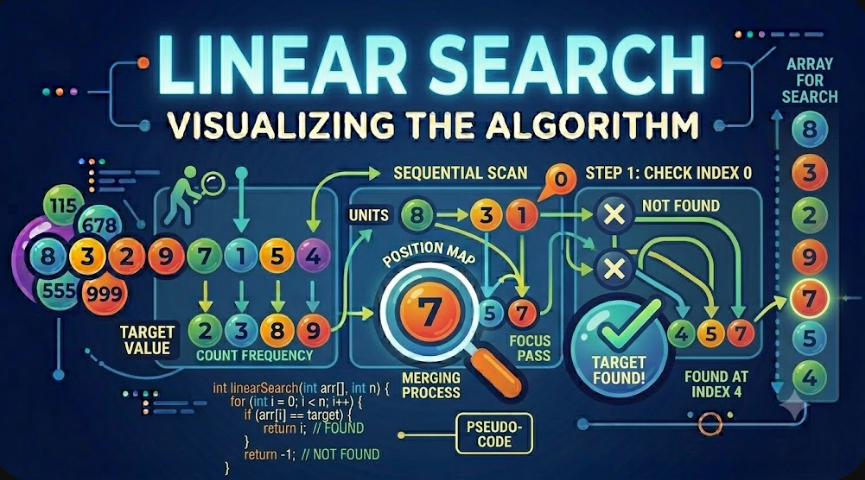
Linear Search Algorithm Explained
Linear Search is one of the simplest searching algorithms in computer science. It checks each element in a list one by one until it finds the target value or reaches the end of the list.
Linear Search is easy to understand, easy to implement, and useful when the data is small, unsorted, or when no special structure is available. Although it is not the fastest search algorithm for large datasets, it is an important foundation for learning how search algorithms work.
Introduction
Searching is one of the most common operations in programming. Developers often need to find a specific number, name, ID, product, user, file, record, or object inside a collection of data.
Before learning advanced searching algorithms such as Binary Search, hash-based lookup, tree search, or graph traversal, it is important to understand Linear Search. Linear Search represents the most direct way to search: start from the beginning and check every element until the answer is found.
The algorithm is simple, but it teaches important concepts such as iteration, comparison, target matching, best case, worst case, and time complexity analysis.
What Is Linear Search?
Linear Search is a searching algorithm that scans elements sequentially. It starts at the first element, compares it with the target value, and continues moving forward until it either finds the target or finishes checking all elements.
The main idea is simple:
Start from the first element.
Compare the current element with the target value.
If they match, return the index or the element.
If they do not match, move to the next element.
If the search reaches the end without finding the target, return not found.
Linear Search is called “linear” because the algorithm moves through the data in a straight line, one element after another.
Why Linear Search Is Important
Linear Search is important because it is the most basic searching technique. Many more advanced algorithms are easier to understand after learning how Linear Search works.
It also has practical value. In real applications, not every dataset is sorted, indexed, or stored in a structure that supports fast searching. Sometimes the simplest approach is the correct approach, especially when the data size is small.
For example, if an array contains only 10 items, using Linear Search may be perfectly acceptable. There is no need to add complexity if the simple solution is clear, reliable, and fast enough for the problem.
How Linear Search Works
Linear Search works by comparing the target value with each element in the collection. The algorithm does not skip elements, does not divide the array, and does not require the array to be sorted.
For example, if we need to find the number 7 in this array:
[4, 2, 9, 7, 1]The algorithm checks the values in order:
Check 4 → not found
Check 2 → not found
Check 9 → not found
Check 7 → found
Once the target is found, the algorithm can stop immediately. There is no need to check the remaining values.
Manual Run Example
Let us manually search for the target value 9 in the following array:
[5, 3, 8, 9, 2]The target value is:
Target = 9Step 1: Check the First Element
The first element is 5.
Index 0 → Value 5Compare 5 with the target 9:
5 == 9 ? NoThe value is not found, so the algorithm moves to the next element.
Step 2: Check the Second Element
The second element is 3.
Index 1 → Value 3Compare 3 with the target 9:
3 == 9 ? NoThe value is still not found, so the algorithm continues.
Step 3: Check the Third Element
The third element is 8.
Index 2 → Value 8Compare 8 with the target 9:
8 == 9 ? NoThe algorithm moves to the next element.
Step 4: Check the Fourth Element
The fourth element is 9.
Index 3 → Value 9Compare 9 with the target 9:
9 == 9 ? YesThe target value is found at index 3.
Search Result
Target 9 found at index 3The algorithm stops as soon as it finds the target. It does not need to check the final element 2.
Manual Run When the Value Is Not Found
Now let us search for the target value 6 in the same array:
[5, 3, 8, 9, 2]The target value is:
Target = 6The algorithm checks every element:
Index 0 → 5 == 6 ? No
Index 1 → 3 == 6 ? No
Index 2 → 8 == 6 ? No
Index 3 → 9 == 6 ? No
Index 4 → 2 == 6 ? No
The search reaches the end of the array without finding the target.
Search Result
Target 6 was not foundThis is the worst-case behavior of Linear Search because every element must be checked.
Linear Search Algorithm Steps
The Linear Search algorithm can be described using these steps:
Receive an array and a target value.
Start from the first index of the array.
Compare the current value with the target.
If the current value equals the target, return the current index.
If not, move to the next element.
Repeat until the target is found or the array ends.
If the array ends without a match, return -1 or a not found result.
This structure is simple and works with almost any list-like collection.
Pseudocode
linearSearch(array, target):
    for i from 0 to length(array) - 1:
        if array[i] == target:
            return i

    return -1
The returned value depends on the implementation. Many algorithms return the index of the found element. If the element is not found, they return -1.
Linear Search Example in PHP
Here is a clean PHP implementation of Linear Search:
<?php

function linearSearch(array $items, mixed $target): int
{
    foreach ($items as $index => $item) {
        if ($item === $target) {
            return $index;
        }
    }

    return -1;
}

$numbers = [5, 3, 8, 9, 2];

$result = linearSearch($numbers, 9);

echo $result;
The output will be:
3The value 9 exists at index 3, so the function returns 3.
Linear Search in PHP When Value Is Not Found
If we search for a value that does not exist:
<?php

$numbers = [5, 3, 8, 9, 2];

$result = linearSearch($numbers, 6);

echo $result;
The output will be:
-1The function returns -1 because the target value 6 does not exist in the array.
Linear Search Example in JavaScript
Here is the same algorithm implemented in JavaScript:
function linearSearch(items, target) {
    for (let i = 0; i < items.length; i++) {
        if (items[i] === target) {
            return i;
        }
    }

    return -1;
}

const numbers = [5, 3, 8, 9, 2];

console.log(linearSearch(numbers, 9));
The output will be:
3The JavaScript version follows the same logic as the PHP version. It loops through the array and returns the index when the target is found.
Linear Search with Strings
Linear Search is not limited to numbers. It can also search strings, names, categories, or any comparable values.
For example, we can search for a name inside an array:
<?php

$names = ['Ali', 'Sara', 'Omar', 'Lina'];

$result = linearSearch($names, 'Omar');

echo $result;
The output will be:
2The name Omar is located at index 2.
Linear Search with Objects
In real applications, developers often search inside arrays of objects or associative arrays. In this case, the comparison usually checks a specific field such as an ID, email, username, or product code.
Here is a PHP example that searches for a user by ID:
<?php

function findUserById(array $users, int $targetId): ?array
{
    foreach ($users as $user) {
        if ($user['id'] === $targetId) {
            return $user;
        }
    }

    return null;
}

$users = [
    ['id' => 1, 'name' => 'Ali'],
    ['id' => 2, 'name' => 'Sara'],
    ['id' => 3, 'name' => 'Omar'],
];

$user = findUserById($users, 2);

print_r($user);
The output will be:
Array
(
    [id] => 2
    [name] => Sara
)
This example is closer to real backend development because searching by ID is a common operation.
Linear Search with Objects in JavaScript
Here is a similar example in JavaScript:
function findUserById(users, targetId) {
    for (const user of users) {
        if (user.id === targetId) {
            return user;
        }
    }

    return null;
}

const users = [
    { id: 1, name: 'Ali' },
    { id: 2, name: 'Sara' },
    { id: 3, name: 'Omar' }
];

console.log(findUserById(users, 2));
The output will be:
{ id: 2, name: 'Sara' }This is still Linear Search because the algorithm checks users one by one until it finds a matching ID.
Time Complexity of Linear Search
Time complexity describes how the running time of an algorithm grows as the input size increases. Linear Search has a simple time complexity because it checks elements one by one.
Linear Search has three important time complexity cases:
Best case: O(1)
Average case: O(n)
Worst case: O(n)
Where n is the number of elements in the array.
Best Case Time Complexity: O(1)
The best case happens when the target value is found at the first position.
Array:  [9, 5, 3, 8, 2]
Target: 9
The algorithm checks the first element:
9 == 9 ? YesThe value is found immediately, so the algorithm performs only one comparison.
Therefore, the best case time complexity is:
O(1)This means constant time. The result is found immediately regardless of the size of the array.
Average Case Time Complexity: O(n)
The average case happens when the target value is somewhere in the middle of the array, or when we consider many possible search positions.
Array:  [5, 3, 8, 9, 2]
Target: 8
The algorithm may need to check several elements before finding the target.
On average, Linear Search checks about half of the array. However, in Big O notation, constants are ignored, so half of n is still written as:
O(n)This means the running time grows linearly as the input size grows.
Worst Case Time Complexity: O(n)
The worst case happens when the target value is at the last position or does not exist in the array.
Array:  [5, 3, 8, 9, 2]
Target: 2
The algorithm checks every element until it reaches the last one.
5 == 2 ? No
3 == 2 ? No
8 == 2 ? No
9 == 2 ? No
2 == 2 ? Yes
If the target does not exist, the algorithm still checks every element before returning not found.
Therefore, the worst case time complexity is:
O(n)Why Linear Search Is O(n)
Linear Search is O(n) because the number of checks grows directly with the number of elements.
If the array has 10 elements, the worst case may require 10 checks. If the array has 1,000 elements, the worst case may require 1,000 checks. If the array has 1,000,000 elements, the worst case may require 1,000,000 checks.
This direct relationship is called linear growth.
Input size: 10        Maximum checks: 10
Input size: 100       Maximum checks: 100
Input size: 1000      Maximum checks: 1000
That is why the algorithm is called Linear Search and why its worst-case time complexity is O(n).
Space Complexity of Linear Search
Space complexity describes how much extra memory an algorithm uses. Linear Search only needs a few variables such as an index and the target value.
It does not create another array or data structure.
Therefore, the space complexity is:
O(1)This means Linear Search uses constant extra memory.
Does Linear Search Require Sorted Data?
No, Linear Search does not require sorted data. This is one of its main advantages.
Linear Search works on:
Sorted arrays.
Unsorted arrays.
Arrays with duplicate values.
Arrays of numbers.
Arrays of strings.
Arrays of objects or records.
Because Linear Search checks every element one by one, it does not need any special order.
Linear Search with Duplicate Values
If the array contains duplicate values, Linear Search usually returns the first matching index.
For example:
Array:  [4, 2, 7, 2, 9]
Target: 2
The target 2 appears at index 1 and index 3. A standard Linear Search returns index 1 because it is the first match.
Result: 1If developers need all matching positions, the algorithm must continue searching after finding the first match.
Finding All Matches with Linear Search
Sometimes we do not want only the first match. We may need all indexes where the target appears.
Here is an example in PHP:
<?php

function findAllIndexes(array $items, mixed $target): array
{
    $indexes = [];

    foreach ($items as $index => $item) {
        if ($item === $target) {
            $indexes[] = $index;
        }
    }

    return $indexes;
}

$numbers = [4, 2, 7, 2, 9];

print_r(findAllIndexes($numbers, 2));
The output will be:
Array
(
    [0] => 1
    [1] => 3
)
This version does not stop after the first match. It scans the whole array and collects all matching indexes.
Linear Search vs Binary Search
Linear Search and Binary Search are both searching algorithms, but they work differently.
Linear Search checks elements one by one. Binary Search repeatedly divides a sorted array in half.
Main differences include:
Linear Search works on unsorted data.
Binary Search requires sorted data.
Linear Search has worst-case time complexity O(n).
Binary Search has worst-case time complexity O(log n).
Linear Search is simpler to implement.
Binary Search is faster for large sorted arrays.
If the data is small or unsorted, Linear Search can be a good choice. If the data is large and sorted, Binary Search is usually much faster.
Linear Search vs Hash Table Lookup
Hash table lookup is usually much faster than Linear Search when searching by a key. In many programming languages, associative arrays, maps, dictionaries, or objects can provide near O(1) average lookup time.
For example, searching for a user by ID in a simple array requires checking users one by one. But if users are stored in a map where the ID is the key, the lookup can be much faster.
However, hash tables require a suitable key and additional memory. Linear Search is simpler and works even when data is not indexed.
When Should Developers Use Linear Search?
Developers should use Linear Search when the data is small, unsorted, or when simplicity is more important than advanced performance.
Linear Search is useful when:
The dataset is small.
The array is unsorted.
The search operation is not repeated frequently.
The data structure does not support faster lookup.
The code needs to be simple and readable.
The target may be found near the beginning.
The developer needs to search objects using custom conditions.
In many practical cases, Linear Search is good enough and avoids unnecessary complexity.
When Not to Use Linear Search
Linear Search is not ideal for large datasets when search operations happen frequently. If an application repeatedly searches through thousands or millions of elements, Linear Search can become slow.
Developers should avoid Linear Search when:
The dataset is very large.
Search operations happen many times.
The data can be sorted and Binary Search can be used.
The data can be indexed using a hash table or database index.
Performance is critical.
For large systems, it is usually better to use indexes, maps, database queries, or more suitable data structures.
Practical Example: Searching a Product by SKU
Imagine a small list of products where each product has a SKU. If the list is small, Linear Search can find a product clearly and directly.
<?php

function findProductBySku(array $products, string $sku): ?array
{
    foreach ($products as $product) {
        if ($product['sku'] === $sku) {
            return $product;
        }
    }

    return null;
}

$products = [
    ['sku' => 'P100', 'name' => 'Keyboard'],
    ['sku' => 'P200', 'name' => 'Mouse'],
    ['sku' => 'P300', 'name' => 'Monitor'],
];

$product = findProductBySku($products, 'P200');

print_r($product);
The output will be:
Array
(
    [sku] => P200
    [name] => Mouse
)
This example shows how Linear Search can be useful in real application logic when the data size is small.
Practical Example: Searching a Menu Item
Linear Search can also be useful for simple interface logic. For example, a website may search a small menu array to find a matching route.
Menu items:
Home, About, Blog, Contact

Target:
Blog
The algorithm checks each item:
Home → not match
About → not match
Blog → match
For a small menu, Linear Search is simple and efficient enough.
Common Mistakes When Implementing Linear Search
Linear Search is simple, but beginners can still make mistakes.
Common mistakes include:
Forgetting to return a not found value.
Returning too early before checking all elements.
Using loose comparison when strict comparison is needed.
Confusing the value with the index.
Continuing the loop after the target is already found when only one match is needed.
Using Linear Search repeatedly on large data without considering better structures.
In PHP, using strict comparison === is often safer than loose comparison == because it checks both value and type.
Practical Checklist for Understanding Linear Search
Before moving to Binary Search or advanced data structures, developers should be able to answer these questions:
What does Linear Search do?
Does Linear Search require sorted data?
What happens when the target is found at the first element?
What happens when the target is not found?
Why is the best case O(1)?
Why is the worst case O(n)?
What is the space complexity?
When should Linear Search be replaced with Binary Search or a hash table?
If these questions are clear, the developer understands the real logic of Linear Search, not only the code.
Advantages of Linear Search
Linear Search has several advantages that make it useful in specific situations.
It is very easy to understand.
It is easy to implement.
It works on unsorted data.
It works with numbers, strings, and objects.
It does not require extra memory.
It can stop early when the target is found.
It is useful for small datasets.
These advantages make Linear Search a good first searching algorithm for beginners.
Disadvantages of Linear Search
Linear Search also has important limitations.
It is slow for large datasets.
Its average and worst case time complexity is O(n).
It does not take advantage of sorted data.
It can become inefficient when repeated many times.
It is usually worse than indexed lookup for large collections.
Because of these limitations, Linear Search is not the best choice for performance-critical searching in large systems.
Linear Search in Real Software Projects
Linear Search appears in real software projects more often than many beginners expect. Developers use it when filtering arrays, finding records in small collections, checking selected options, validating a value against a short list, or searching objects by a condition.
For example, a Laravel or PHP application may receive a small array of settings, roles, tags, or selected fields. Searching through that small array with a simple loop can be clearer than building a complex data structure.
However, when searching database records, developers should usually rely on database queries and indexes instead of loading large amounts of data into memory and searching with Linear Search manually.
Conclusion
Linear Search is a simple searching algorithm that checks each element one by one until it finds the target value or reaches the end of the array.
It is easy to understand, works on unsorted data, supports many types of values, and uses constant extra memory. Its best case time complexity is O(1) when the target is found immediately, while its average and worst case time complexity is O(n).
Linear Search is not ideal for large datasets or repeated searches, but it is very useful for small arrays, unsorted data, custom conditions, and educational examples.
For developers learning data structures and algorithms, Linear Search is an important starting point. It teaches the basic idea of searching, comparison, iteration, early stopping, and complexity analysis. Understanding Linear Search prepares developers to learn faster techniques such as Binary Search, hash table lookup, database indexing, and tree-based search.

