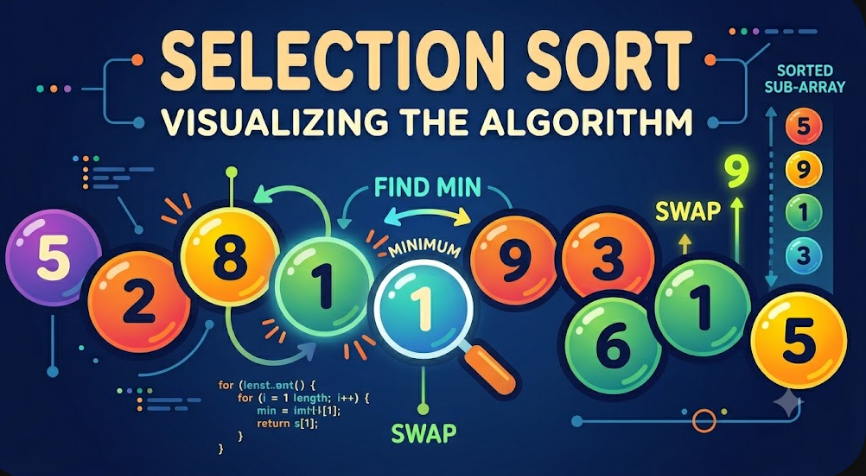
Selection Sort Algorithm Explained
Selection Sort is a simple sorting algorithm that works by repeatedly finding the smallest element from the unsorted part of an array and placing it at the beginning. It is called Selection Sort because the algorithm selects the next correct element in each pass.
Although Selection Sort is not efficient for large datasets, it is very useful for learning how sorting algorithms work. It helps beginners understand comparison-based sorting, array traversal, swapping, in-place algorithms, and time complexity analysis.
Introduction
Sorting is one of the most important topics in computer science and programming. Many real applications need data to be sorted before searching, displaying, filtering, ranking, or processing it efficiently.
Before learning advanced sorting algorithms such as Merge Sort, Quick Sort, or Heap Sort, beginners usually start with simpler algorithms such as Bubble Sort, Selection Sort, and Insertion Sort. These algorithms are easier to understand because their logic can be traced manually step by step.
Selection Sort is especially useful because its idea is direct: find the smallest value, move it to the correct position, then repeat the same process for the remaining unsorted elements.
What Is Selection Sort?
Selection Sort is a comparison-based sorting algorithm. It divides the array into two parts: a sorted part and an unsorted part.
At the beginning, the sorted part is empty and the entire array is considered unsorted. During each pass, the algorithm searches the unsorted part to find the smallest element. After finding it, the algorithm swaps it with the first element of the unsorted part.
After every pass, one more element is placed in its final sorted position.
Selection Sort can be summarized as follows:
Start from the first position in the array.
Assume the current position contains the smallest value.
Scan the remaining elements to find the real smallest value.
Swap the smallest value with the current position.
Move to the next position and repeat the process.
How Selection Sort Works
Selection Sort works by placing the correct element in the correct position one step at a time. Unlike Bubble Sort, which repeatedly swaps adjacent elements, Selection Sort searches for the minimum element first and performs only one swap per pass.
For an array sorted in ascending order, Selection Sort finds the smallest element and places it at index 0. Then it finds the second smallest element and places it at index 1. Then it finds the third smallest element and places it at index 2. This continues until the array becomes sorted.
The important idea is that after each pass, the left side of the array becomes sorted and should not be changed again.
Selection Sort Algorithm Steps
The basic steps of Selection Sort are simple:
Loop through the array from the first element to the second-to-last element.
Set the current index as the index of the minimum element.
Loop through the remaining unsorted part of the array.
If a smaller element is found, update the minimum index.
After scanning the unsorted part, swap the current element with the minimum element.
Repeat until all elements are in their correct positions.
This process gradually builds the sorted part of the array from left to right.
Manual Run Example
Let us trace Selection Sort manually using this array:
[29, 10, 14, 37, 13]The goal is to sort the array in ascending order.
Initial Array
[29, 10, 14, 37, 13]At this point, the entire array is unsorted.
Pass 1
We start at index 0. The current value is 29. We assume that 29 is the smallest value, then we scan the remaining elements.
Compare 29 with 10. Since 10 is smaller, the minimum becomes 10.
Compare 10 with 14. The minimum remains 10.
Compare 10 with 37. The minimum remains 10.
Compare 10 with 13. The minimum remains 10.
The smallest value in the unsorted part is 10. We swap 29 and 10.
Before swap: [29, 10, 14, 37, 13]
After swap:  [10, 29, 14, 37, 13]
Now 10 is in its correct final position.
Pass 2
Now we move to index 1. The sorted part is:
[10]The unsorted part is:
[29, 14, 37, 13]We assume 29 is the smallest value in the unsorted part, then scan the remaining elements.
Compare 29 with 14. Since 14 is smaller, the minimum becomes 14.
Compare 14 with 37. The minimum remains 14.
Compare 14 with 13. Since 13 is smaller, the minimum becomes 13.
The smallest value in the unsorted part is 13. We swap 29 and 13.
Before swap: [10, 29, 14, 37, 13]
After swap:  [10, 13, 14, 37, 29]
Now 10 and 13 are in their correct positions.
Pass 3
The sorted part is:
[10, 13]The unsorted part is:
[14, 37, 29]We start at index 2. The current value is 14. We assume 14 is the smallest value in the unsorted part.
Compare 14 with 37. The minimum remains 14.
Compare 14 with 29. The minimum remains 14.
The smallest value is already in the correct position, so no real swap is needed.
Array remains: [10, 13, 14, 37, 29]Now 10, 13, and 14 are sorted.
Pass 4
The sorted part is:
[10, 13, 14]The unsorted part is:
[37, 29]We start at index 3. The current value is 37. We compare it with the remaining value 29.
Compare 37 with 29. Since 29 is smaller, the minimum becomes 29.
We swap 37 and 29.
Before swap: [10, 13, 14, 37, 29]
After swap:  [10, 13, 14, 29, 37]
The array is now sorted.
Final Sorted Array
[10, 13, 14, 29, 37]This manual run shows the main behavior of Selection Sort. In every pass, the algorithm selects the smallest element from the unsorted part and moves it to the correct position.
Selection Sort Pseudocode
Pseudocode helps explain the algorithm without focusing on a specific programming language.
selectionSort(array):
    n = length(array)

    for i from 0 to n - 2:
        minIndex = i

        for j from i + 1 to n - 1:
            if array[j] < array[minIndex]:
                minIndex = j

        if minIndex is not i:
            swap array[i] and array[minIndex]

    return array
The outer loop controls the current position. The inner loop searches for the smallest element in the unsorted part of the array.
Selection Sort Example in PHP
The following example implements Selection Sort in PHP. The function receives an array of numbers and returns the sorted array.
<?php

function selectionSort(array $numbers): array
{
    $count = count($numbers);

    for ($i = 0; $i < $count - 1; $i++) {
        $minIndex = $i;

        for ($j = $i + 1; $j < $count; $j++) {
            if ($numbers[$j] < $numbers[$minIndex]) {
                $minIndex = $j;
            }
        }

        if ($minIndex !== $i) {
            $temp = $numbers[$i];
            $numbers[$i] = $numbers[$minIndex];
            $numbers[$minIndex] = $temp;
        }
    }

    return $numbers;
}

$numbers = [29, 10, 14, 37, 13];
$sortedNumbers = selectionSort($numbers);

print_r($sortedNumbers);
The output will be:
Array
(
    [0] => 10
    [1] => 13
    [2] => 14
    [3] => 29
    [4] => 37
)
This implementation uses a temporary variable to swap elements. It also checks whether the minimum index is different from the current index before swapping, which avoids unnecessary swaps.
Selection Sort Example in JavaScript
The same algorithm can also be implemented in JavaScript using arrays and nested loops.
function selectionSort(numbers) {
    const result = [...numbers];
    const count = result.length;

    for (let i = 0; i < count - 1; i++) {
        let minIndex = i;

        for (let j = i + 1; j < count; j++) {
            if (result[j] < result[minIndex]) {
                minIndex = j;
            }
        }

        if (minIndex !== i) {
            const temp = result[i];
            result[i] = result[minIndex];
            result[minIndex] = temp;
        }
    }

    return result;
}

const numbers = [29, 10, 14, 37, 13];
console.log(selectionSort(numbers));
The output will be:
[10, 13, 14, 29, 37]In this JavaScript version, the original array is copied first using the spread operator. This prevents the function from modifying the original input array directly.
Understanding Time Complexity
Time complexity describes how the running time of an algorithm grows as the input size grows. For Selection Sort, the main cost comes from comparisons inside the nested loops.
Selection Sort always scans the remaining unsorted part of the array to find the minimum element. This happens even if the array is already sorted.
For an array with n elements:
Pass 1 performs n - 1 comparisons.
Pass 2 performs n - 2 comparisons.
Pass 3 performs n - 3 comparisons.
This continues until the final pass performs 1 comparison.
The total number of comparisons is:
(n - 1) + (n - 2) + (n - 3) + ... + 1This sum equals:
n(n - 1) / 2When we analyze Big O notation, we ignore constants and smaller terms. Therefore, the time complexity becomes:
O(n²)Best Case Time Complexity
The best case happens when the array is already sorted.
[10, 13, 14, 29, 37]However, Selection Sort still needs to scan the unsorted part during every pass to confirm that the current element is the smallest. Because of that, the number of comparisons does not change.
Best Case Time Complexity: O(n²)This is one major difference between Selection Sort and optimized Bubble Sort. Optimized Bubble Sort can stop early if no swaps happen, but basic Selection Sort still performs the same comparison structure.
Average Case Time Complexity
The average case happens when the elements are in random order.
[29, 10, 14, 37, 13]Selection Sort must repeatedly search the unsorted part for the minimum value. The number of comparisons remains proportional to n².
Average Case Time Complexity: O(n²)Worst Case Time Complexity
The worst case happens when the array is sorted in reverse order.
[37, 29, 14, 13, 10]Even in this situation, Selection Sort performs the same number of comparisons as it does in the best and average cases.
Worst Case Time Complexity: O(n²)The order of the input affects the number of swaps, but it does not change the number of comparisons in the standard Selection Sort algorithm.
Space Complexity
Selection Sort is an in-place sorting algorithm. This means it does not need another array to store the sorted result. It sorts the array by swapping elements inside the same array.
The only extra memory used is for a few variables such as the loop counters, the minimum index, and a temporary variable for swapping.
Space Complexity: O(1)This makes Selection Sort memory efficient, even though it is not time efficient for large arrays.
Number of Swaps in Selection Sort
One useful characteristic of Selection Sort is that it performs a small number of swaps compared to Bubble Sort. In each pass, it performs at most one swap.
For n elements, Selection Sort performs at most:
n - 1 swapsThis can be useful when swapping is expensive. However, in most modern applications, the high number of comparisons makes Selection Sort slower than more advanced sorting algorithms for large datasets.
Is Selection Sort Stable?
A stable sorting algorithm preserves the original order of equal elements. Standard Selection Sort is not stable because swapping can move equal elements past each other.
For example, imagine two records have the same score but different original positions. A normal swap operation may change their relative order.
Selection Sort can be modified to become stable, but the standard implementation is usually considered unstable.
Is Selection Sort In-Place?
Yes, Selection Sort is in-place. It sorts the array without requiring extra storage proportional to the input size.
This means the memory usage remains constant even when the input array grows.
In-place: Yes
Extra memory: Constant
Space complexity: O(1)
Selection Sort vs Bubble Sort
Selection Sort and Bubble Sort are both simple comparison-based sorting algorithms. They are often taught together because both use nested loops and both have O(n²) time complexity.
However, they work differently.
Bubble Sort: Repeatedly compares adjacent elements and swaps them if they are in the wrong order.
Selection Sort: Finds the smallest element in the unsorted part and swaps it into the correct position.
Bubble Sort may perform many swaps in one pass, while Selection Sort performs at most one swap per pass. On the other hand, optimized Bubble Sort can stop early when the array is already sorted, while Selection Sort usually continues scanning.
Advantages of Selection Sort
Selection Sort has several advantages, especially for educational purposes and small datasets.
It is easy to understand and implement.
It works in-place and requires constant extra memory.
It performs a limited number of swaps.
It helps beginners understand nested loops and minimum value search.
It is useful for explaining basic algorithm analysis.
These advantages make Selection Sort a good learning algorithm, even though it is not usually the best choice for production-level sorting.
Disadvantages of Selection Sort
The main disadvantage of Selection Sort is its poor performance on large datasets. Since it uses nested loops, the number of comparisons grows quickly as the input size increases.
It has O(n²) time complexity in best, average, and worst cases.
It does not naturally benefit from already sorted input.
It is usually slower than Merge Sort, Quick Sort, and built-in language sorting functions.
The standard implementation is not stable.
It is not suitable for large real-world datasets.
Because of these limitations, Selection Sort is mainly used for learning, demonstrations, and very small collections.
When Should Developers Use Selection Sort?
Developers should use Selection Sort when the goal is learning, teaching, or working with very small arrays where performance is not critical.
Selection Sort may be acceptable when:
The dataset is very small.
The goal is to explain sorting manually.
Memory usage must stay constant.
The number of swaps should be limited.
The code is used for educational examples or algorithm practice.
For large datasets or production applications, developers should usually use built-in sorting functions or more efficient algorithms.
When Not to Use Selection Sort
Selection Sort should not be used when performance matters and the dataset can grow. Its O(n²) time complexity makes it inefficient compared to advanced sorting algorithms.
Developers should avoid Selection Sort when:
The array contains thousands or millions of elements.
The application requires fast sorting.
The input may already be sorted and early stopping is important.
Stable sorting is required.
A language provides a highly optimized built-in sort function.
In professional projects, built-in sorting functions are usually better because they are optimized, tested, and suitable for real-world use.
Common Mistakes When Implementing Selection Sort
Beginners often make small mistakes when implementing Selection Sort. These mistakes usually happen because of incorrect loop boundaries or incorrect swap logic.
Common mistakes include:
Starting the inner loop from 0 instead of i + 1.
Forgetting to update the minimum index.
Swapping inside the inner loop instead of after the minimum is found.
Using the minimum value instead of the minimum index.
Running the outer loop one step too far.
Modifying the original array when a copied array was expected.
The most important rule is this: first find the minimum index, then swap once after the inner loop finishes.
Practical Checklist for Understanding Selection Sort
To make sure you understand Selection Sort, ask these questions:
Can I explain why the algorithm is called Selection Sort?
Can I identify the sorted and unsorted parts of the array?
Can I manually trace each pass of the algorithm?
Can I explain why the time complexity is O(n²)?
Can I explain why the space complexity is O(1)?
Can I describe the difference between Selection Sort and Bubble Sort?
Can I implement Selection Sort without swapping inside the inner loop?
If you can answer these questions, you have a solid understanding of Selection Sort.
Selection Sort in Real Software Projects
Selection Sort is rarely used directly in modern production systems because most programming languages already provide efficient built-in sorting methods. For example, PHP has sorting functions such as sort, usort, and arsort. JavaScript provides the sort method for arrays.
However, learning Selection Sort is still valuable. It teaches developers how algorithms process data, why complexity matters, and why choosing the right algorithm can affect application performance.
Understanding simple algorithms also prepares developers for technical interviews, problem-solving tasks, and more advanced algorithm topics.
Conclusion
Selection Sort is a simple sorting algorithm that repeatedly selects the smallest element from the unsorted part of an array and places it in the correct position. It is easy to understand, easy to implement, and useful for learning the basics of sorting and algorithm analysis.
The algorithm has O(n²) time complexity in the best, average, and worst cases because it always compares elements using nested loops. It has O(1) space complexity because it sorts the array in-place without requiring extra memory proportional to the input size.
Selection Sort is not the best choice for large datasets, but it is an excellent algorithm for beginners. It helps developers understand sorting logic, manual tracing, comparisons, swaps, in-place processing, and Big O notation.
After learning Selection Sort, developers can move to more efficient algorithms such as Insertion Sort, Merge Sort, Quick Sort, and Heap Sort with a stronger understanding of how sorting algorithms are designed and analyzed.

